Anvil — Minecraft Server Manager for Windows
A downloadable tool for Windows
ANVIL - MINECRAFT SERVER MANAGER FOR WINDOWS
Run your own Minecraft server with friends, modded or vanilla, without touching
a command line or editing a single config file.
Anvil installs the right version of Java for you, sets up the server, checks
your mods before they can break anything, and walks you through getting friends
connected. If you have ever given up on a modded server because of a crash log
you could not read, this is built for exactly that.
WHAT IT DOES
- Installs everything for you. The correct Java version, the mod loader and the
Minecraft server files, onto your PC. Java comes straight from Eclipse
Adoptium and is checked against their published SHA-256 before it is
unpacked. Anvil then downloads the official loader installer, which fetches
Minecraft itself from Mojang. You never install Java yourself.
- Modded or vanilla. NeoForge, Fabric and Forge for modpacks. Or pick Vanilla
for plain Minecraft, which downloads straight from Mojang, is checked against
Mojang's own hash, and is ready in about two minutes.
- Checks your mods before they break anything. Anvil opens every jar file and
reads what is actually inside it, then tells you plainly: this one is for the
wrong Minecraft version, this one is for the wrong loader, this one is a
graphics mod that will stop your server starting, this one is client-side and
simply is not needed here. One button moves the problem ones aside - they are
renamed rather than deleted, so you can turn any of them back on later.
- Manages several servers at once. Different Minecraft versions, different
modpacks, all in one window. Each new server is given its own port, so you
can run more than one at the same time without changing anything.
- Keeps multiple worlds per server. Duplicate a world before a risky build,
keep a creative world beside your survival one, switch with one click.
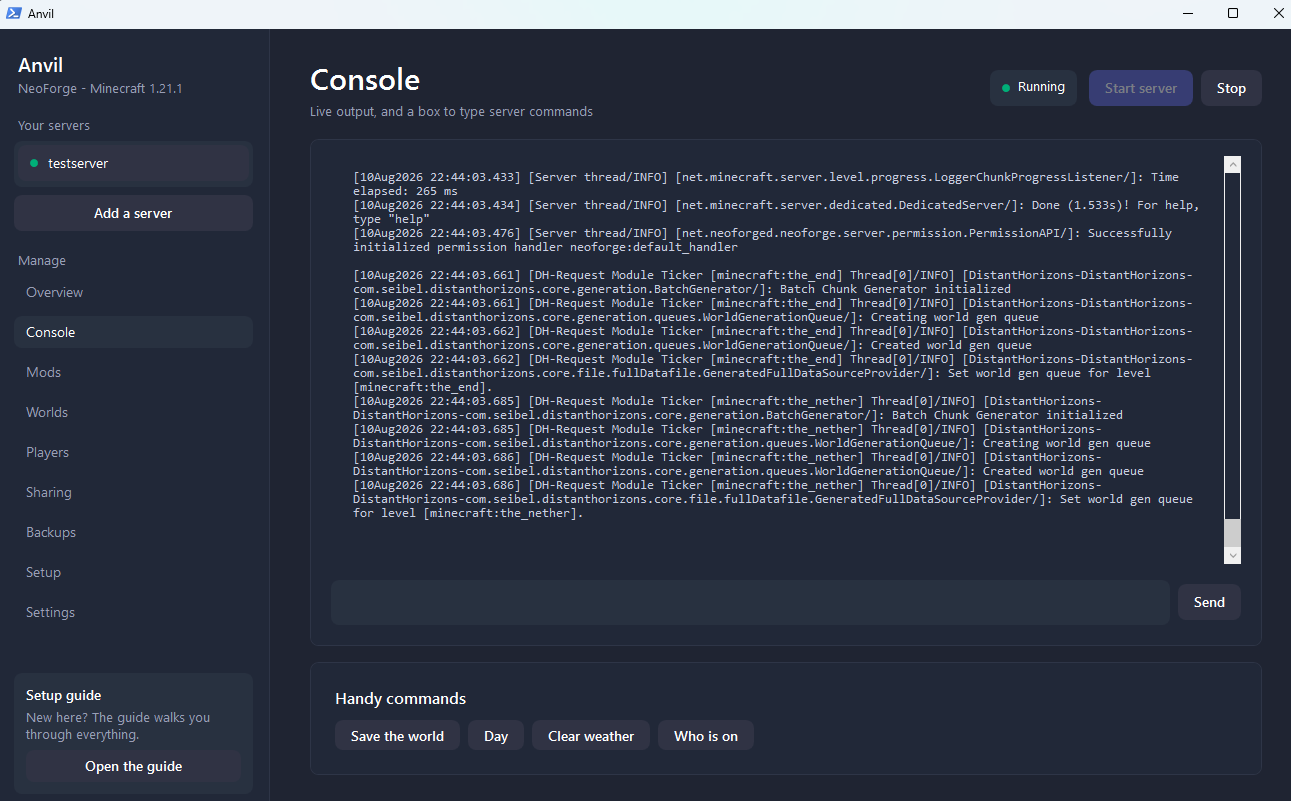
- Live console with a command box. Type op, whitelist, weather, time - no black
terminal window. Each server keeps its own scrollback.
- One-click backups and restore, with no size limit. Restoring renames your
current world instead of deleting it, so it is always reversible.
- Guides you through letting friends in. A numbered walkthrough on screen and a
fuller one in the guide, using a free tunnel that needs no router changes and
keeps your home IP address private. Works even on connections where opening a
port is impossible.
- Plain-English settings. Every setting in your server.properties file laid out
in a proper editor, with the ones that matter most explained in ordinary
words next to the box.
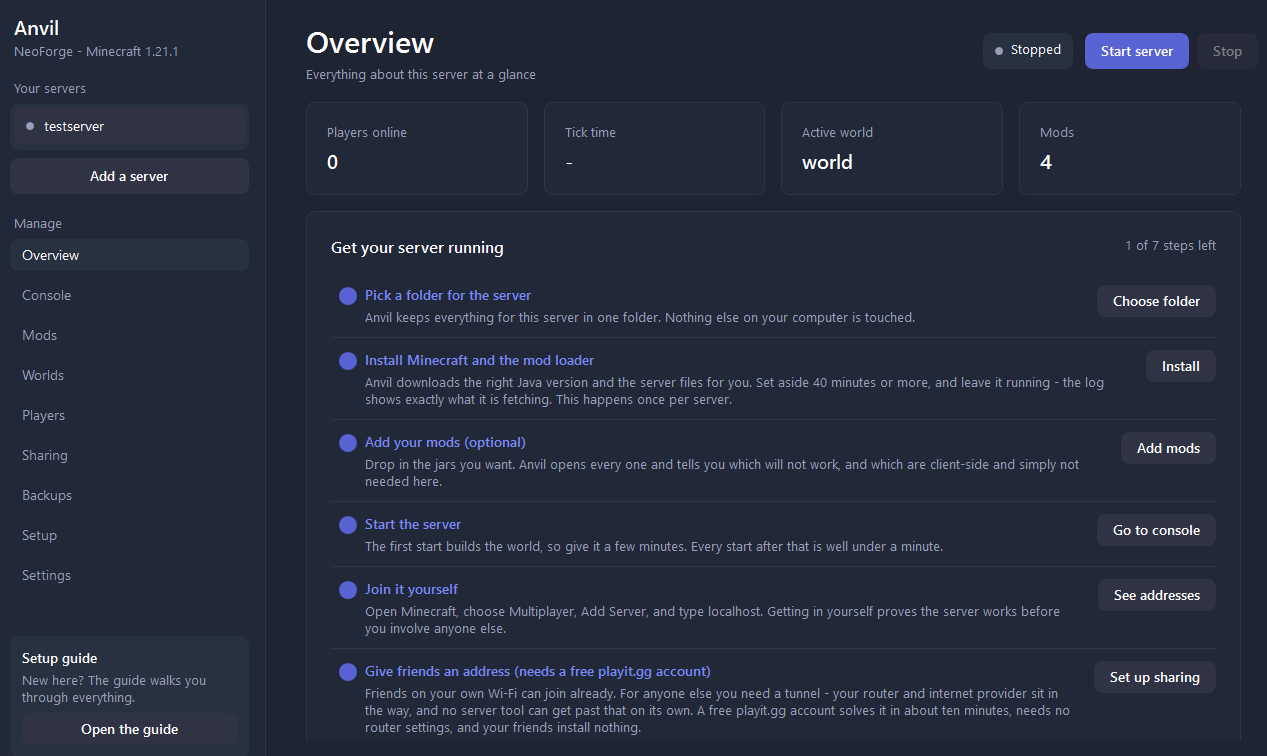
- A setup checklist that tracks where you actually are, so you always know the
next thing to do.
WHAT YOU GET
- Anvil.bat and Anvil.ps1 - the app
- START-HERE.md - a full illustrated-in-words guide, including a complete
step-by-step walkthrough for getting friends connected
Instant download after purchase.
REQUIREMENTS
- Windows 10 or 11
- About 5 GB free disk space per modded server (a vanilla one needs far less)
- 8 GB RAM or more (16 GB recommended for large modpacks). Anvil suggests
giving the server around half of what your PC has - more is not faster
- An internet connection for setup
- A free playit.gg account, only if you want friends outside your home to join
You do NOT need Java installed. You do NOT need to know any commands.
BEFORE YOU BUY - PLEASE READ
- This is a tool for running a server on YOUR OWN computer. Your PC needs to be
switched on for the server to be online. It is not a hosting subscription.
- FOR FRIENDS OUTSIDE YOUR HOME you also need a free playit.gg account, or
port forwarding on your router, or a VPN such as Tailscale. This is true of
any home server - your router and internet provider sit between your PC and
your friends, and no software can change that on its own. Anvil walks you
through playit.gg step by step; it is free, takes about ten minutes, needs no
router settings, and your friends install nothing. Friends on your own Wi-Fi
need none of this and can join immediately.
- Installing a MODDED server takes 40 minutes or more the first time. Most of
that is the mod loader collecting several hundred small files one at a time -
a fast connection barely changes it. After that, starting takes under a
minute. A vanilla server installs in about two minutes.
- Each server keeps its own copy of Java, so a second modded server is another
5 GB rather than a small addition. The upside is that deleting a server
folder removes every trace of it.
- Windows will show a "Windows protected your PC" warning the first time,
because the app is not code-signed. Click More info, then Run anyway. The app
is plain readable text - you can open it in Notepad and check it yourself.
- Windows only. No Mac or Linux version.
- Mods and Minecraft itself are not included. Everything is downloaded onto
your computer from the official sources when you install. You supply your own
mods. This means you always get official, current, unmodified files.
- You need a Minecraft Java Edition account to play.
NOT AFFILIATED
Anvil is an independent tool. Not affiliated with, endorsed by or connected to
Mojang, Microsoft or Minecraft.
SUPPORT
Message me if you get stuck. Most questions are answered in the included guide,
especially the section on matching mod versions and the connection walkthrough.
DIGITAL DOWNLOAD - NO REFUNDS
Because this is an instant digital file, sales are final. Everything you need to
decide is listed above - please read the requirements before buying, and message
me first if you are unsure whether it suits your setup.
Purchase
In order to download this tool you must purchase it at or above the minimum price of $7.77 USD. You will get access to the following files:
Leave a comment
Log in with itch.io to leave a comment.